Aggregates become God Objects
You start with clean boundaries. Six months later: 50 methods, 20 properties, business logic everywhere. DDDesigner warns when aggregates grow too large and helps you split them correctly.

dddesigner
Model Bounded Contexts, Aggregates, Commands, Events, and CQRS read models. Generate code. Keep architecture and implementation in sync.
Design DDD systems before writing code. Control aggregate boundaries. Track event flows across contexts. Generate an application skeleton in your language.
Why visual design matters
The problem isn't understanding DDD theory. The problem is writing code before the model has been designed. You may not realize that aggregate boundaries are wrong until after 200,000 lines of code have been written. Changing those boundaries means refactoring 150 files across 10 services.
Design your model visually before code. Change boundaries in minutes, not weeks.
Three problems that kill DDD projects
You can use AI to write code. But you'll have to design the model manually.
You start with clean boundaries. Six months later: 50 methods, 20 properties, business logic everywhere. DDDesigner warns when aggregates grow too large and helps you split them correctly.
Commands in Confluence. Events in Miro. Code in the repository. Three sources of truth that drift apart. One place to see how the OrderPlaced event reaches the Payment and Inventory contexts.
You design beautiful aggregates in a workshop. But three sprints later, the code no longer resembles the model. The answer is to generate code from the model whenever it changes. Keep the code and the model in sync.
Why existing tools fall short
You can draw boxes labeled 'Aggregate' in any tool. But those tools won't check whether an aggregate is defined incorrectly, a command isn't connected, or an event flow doesn't work. They're presentation tools, not modeling tools.
DDDesigner understands DDD. It validates your model and shows you problems before they become code.
Choosing a DDD tool
Whiteboards, DSL editors, and visual modelers solve different problems. See how DDDesigner compares with Context Mapper, Koine, Miro, and Qlerify on modeling, validation, and code generation.
Open tool comparisonHow DDDesigner works
Model your DDD architecture in one connected workspace. See how objects relate and identify possible problems. Generate code from the model.
Define context boundaries and their relationships. Create events that are passed between contexts.
Model aggregates with their entities and value objects. Connect commands to aggregates. Track which events are emitted. Verify that every command has a handler.
Design command handlers, event-driven projections, and long-running sagas. Define the event flow from a user action to a database update.
Domain-Driven Design
From Event Storming to Bounded Contexts, Aggregates, Commands, Events, CQRS Projections, and code. A complete reference for applying Domain-Driven Design in DDDesigner.
Start with strategic design
Most DDD failures begin with unclear boundaries. Learn what a Bounded Context is, how to map relationships, and how to keep language consistent before implementation.
Domain-Driven Design
Use DDD when business language, boundaries, and invariants matter more than frameworks. Connect strategic design to Aggregates, Events, CQRS, and implementation.
CQRS
Separate Commands that protect invariants from Queries and Projections built for reading. Learn when CQRS helps and when it adds unnecessary complexity.
See it in action
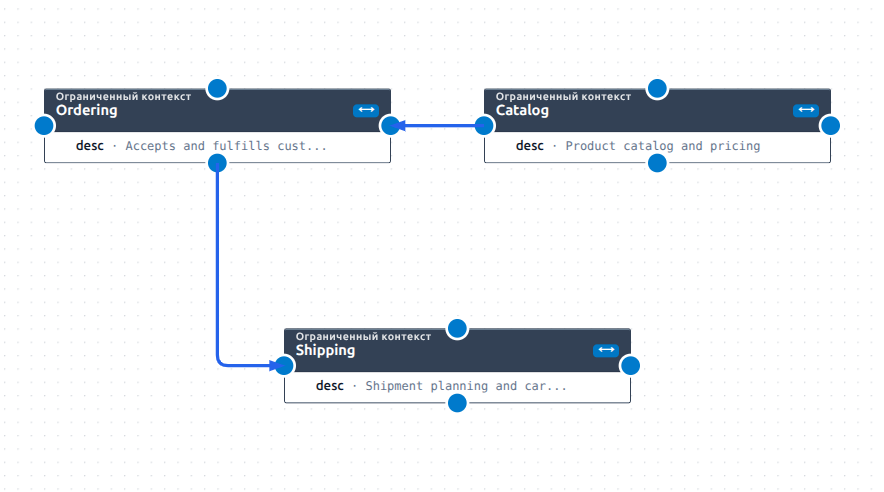
Domain boundaries and the relationships between them.
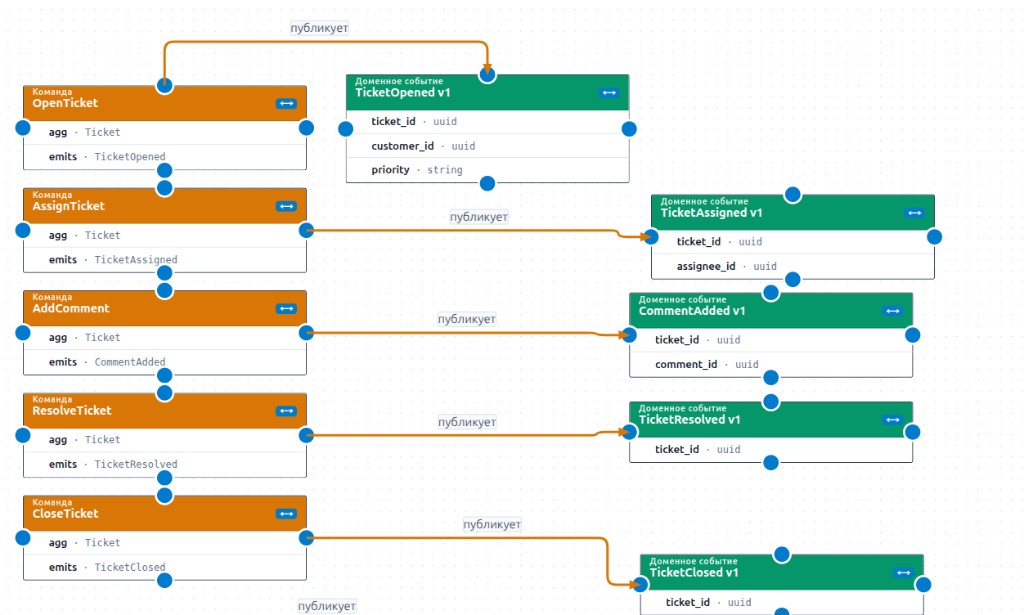
A process from command to event and policy.
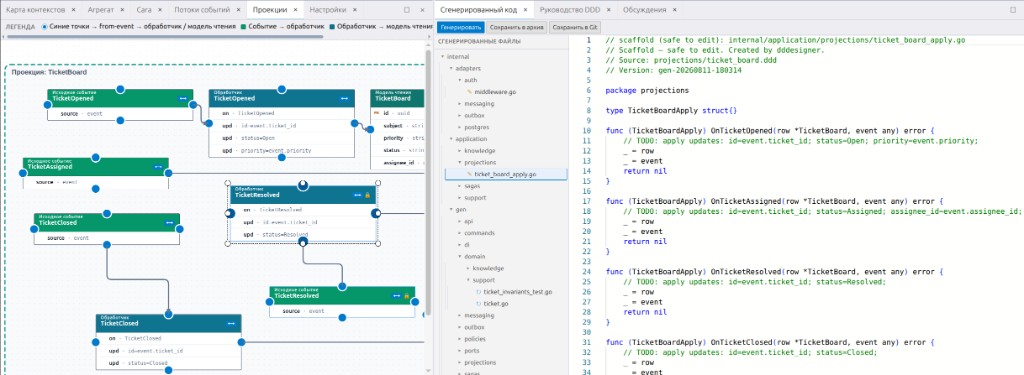
An architectural decision alongside code.
From model to production code
DDDesigner generates code that reflects your architectural decisions. Regenerate it when the model changes: contracts update automatically, while your business logic remains untouched.
Not a magic button. DDDesigner generates the architectural skeleton, including optional Temporal wrappers and opt-in Chronacta event store integration, so you can focus on business logic instead of boilerplate.
Three code generation shapes
One DDD model can produce code in one of three shapes: Monolith, Modular Monolith, or Microservices. Choose the shape that fits your delivery needs — DDDesigner automatically creates the artifacts required for it.
The model stays the same. Only the shape of the generated application and the artifacts required to run and deliver it change.
For the selected shape, DDDesigner creates the required HTTP/OpenAPI or gRPC/protobuf contracts from Use Cases, inputs, and integration events.
Depending on the selected shape, DDDesigner creates the required directories, modules, service scaffolds, Dockerfiles, and, for distributed delivery, a root Docker Compose file.
DDDesigner validates the model and shows which boundaries, relationships, and artifacts will be created. Fix any issues, then click Generate to produce code in the selected shape.
Event Sourcing with Chronacta
Event Sourcing can be implemented manually or with a specialized database. Chronacta provides an append-only event log and built-in tools for working with events, while DDDesigner includes built-in Chronacta support.
Implement Event Sourcing with your own event store, database, or infrastructure. DDDesigner remains useful for modeling aggregates, commands, events, and projections.
Use a dedicated event store with a free developer edition for local development and evaluation. Chronacta is designed for append-only event storage and event-driven applications.
Read about ChronactaSelect Chronacta in the code generation settings. DDDesigner generates event schemas, projection descriptions, a store adapter, and code scaffolding for the selected language. Leave it unselected and your existing code generation stays unchanged.
Read about ChronactaDomain-Driven Design
DDDesigner follows strategic and tactical DDD: bounded contexts, aggregates, ubiquitous language, CQRS, event sourcing, and event-driven architecture. The concepts work. We built the tool to make them practical.
AI at work
Describe how the system should work, and DDDesigner helps turn the conversation into clear model changes.
AI can help explore a new idea, find a missing connection, or suggest how to split an oversized aggregate. For example, you might write: “After payment, the order should notify delivery.” The assistant suggests which command, event, and connection the model may need. You still make the decision.
To give the assistant access, create a personal key in the workspace: open Tools, go to People, and choose Agent keys. Connect editors to the cloud MCP at https://app.dddesigner.com/mcp with that key (header X-Agent-Key). The key belongs to one project; MCP clients do not need a separate project id. The full secret is shown once. If someone else may have seen it, revoke it immediately and create a new one.
The rest is straightforward. The assistant receives a description of the existing model, proposes changes, and DDDesigner checks them before saving. You see the result first and can reject it or ask for a revision. Only changes you have reviewed and approved enter the project. The same connection can run code generation into the chat (preview paths, then fetch selected files)—the same pipeline as Generate in the workspace.
How it works
AI suggests options, but the final decision is always yours.
Built for architects and tech leads
Design bounded contexts, aggregates, and event flows. Validate your model before implementation. Generate skeleton code in 6 languages.
Give your team a shared architectural model. Make design decisions explicit. Onboard new developers with visual documentation that stays current.
Pricing
Free is forever — model DDD, generate a monolith, and share your work. Pro unlocks teams, Git, and microservices.
Learn DDD and ship your first bounded context — no time limit.
For production teams that need scale, Git, and advanced codegen.
Start with a free project. Model your first bounded context. See how the model elements connect.